


 Select your city
 Login
Login
 Select your city Login


 30 Apr 26
 by Shahid Iqbal
 0 Comments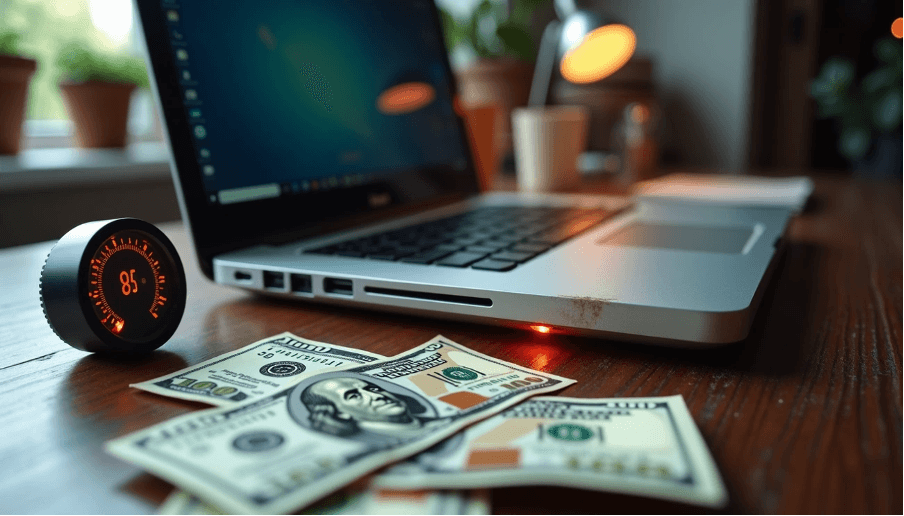
Your old laptop overheating does more than annoy you. It drains hundreds from the laptop's resale value. Overheating can damage hardware components like the motherboard and graphics card. If your old laptop keeps overheating, the median lifespan of internal parts can drop from 3 years to just 1 year. You might wonder why your old laptop is overheating. Maybe you're dealing with a 5 year old laptop overheating or an old gaming laptop overheating. Understanding how to fix old laptop overheating is vital before selling. This piece will help you recover maximum resale value.
Potential buyers examine performance indicators before making purchase decisions, and overheating leaves unmistakable traces that lower your asking price right away. The damage accumulates across multiple components once your 5 year old laptop overheating becomes a pattern, and each reduces what buyers are willing to pay.
Thermal throttling reduces your CPU's clock speed to prevent overheating, creating noticeable performance degradation that buyers spot right away. The processor slows down to reduce heat production once a laptop's internal temperature reaches a certain threshold. This safety mechanism protects components but makes the system sluggish during simple tasks. Buyers testing your laptop will notice lag during simple operations like opening applications or switching between programs. Throttling guides gaming laptops to lower frame rates and less responsive gameplay, affecting the gaming experience by a lot. An old gaming laptop overheating will struggle even with moderately demanding games and send clear signals to buyers that internal cooling has failed. The performance gap becomes obvious once buyers compare your laptop against similar models without heat issues, and this justifies their lower offers.
Heat accelerates component degradation at the microscopic level through several destructive processes. High temperatures speed up electromigration, which decreases chip lifespan by causing metal atoms to migrate within circuits. Excessive heat increases the likelihood of transistor gate dielectric breakdown and reduces component longevity even further. Capacitors suffer from dielectric evaporation in liquid electrolytic types or dielectric degradation in polymer variants once exposed to sustained heat. These technical failures translate to ground problems that buyers recognize. Your laptop might exhibit random errors, unexplained crashes, or intermittent functionality issues that make buyers question reliability. Heat damage occurs over time, so you might experience background errors wasting system resources without obvious symptoms. Buyers who understand these risks will deduct substantial amounts from your resale price and know that replacement parts or repairs await them.
High temperatures cause lithium-ion batteries to degrade faster by increasing chemical reactions within battery cells. This results in reduced capacity over time, meaning your battery won't hold a charge as long as it once did. Your laptop battery struggles to hold a full charge and discharges more quickly than usual once it becomes too hot. This guides to frequent recharging, which accelerates wear and shortens the battery's lifespan. Excessive heat can cause swelling, leakage, or combustion in rare cases. Persistent overheating due to ineffective cooling can cause long-term battery damage. Buyers notice once batteries lose their knowing how to hold a charge, and many will deduct the full replacement cost from their offer. Battery replacements cost between ₹3,000 to ₹8,000 depending on the model, so this single component can slash your resale value by a lot.
Buyers assume the worst once they encounter overheating laptops. Buyers may assume your old laptop has processor or fan problems even if you haven't experienced complete failure yet, provided it keeps overheating frequently. Overheating signals deeper hardware issues that buyers refuse to inherit without compensation. Heat-damaged RAM or busses might cause sluggish performance without obvious failure, but buyers recognize these warning signs. They calculate potential repair costs for processors, cooling systems, and motherboards into their offers and slash hundreds from what you could have received with proper maintenance.
Heat damage creates specific repair costs that buyers calculate into their offers, often reducing your laptop's value by ₹5,000 to ₹15,000 depending on component severity. Understanding these deductions helps you learn why your old laptop keeps overheating translates into lower sale prices.
Graphics cards suffer visible damage when temperatures reach extreme levels. Laptops experiencing GPU temperatures of 100°C or CPU temperatures hitting 99°C face imminent component failure. Constant very high temperatures can damage every component of a computer, especially in a laptop where things are sandwiched together and paired up with often inadequate cooling systems. Overheating damage over time will show graphic artifacts and programs will crash, not just a decrease in FPS. Buyers who spot these warning signs during testing will deduct the cost of potential GPU or processor replacement, which ranges from ₹8,000 to ₹25,000 for mid-range laptops. So an old gaming laptop overheating becomes nearly unsellable at reasonable prices because gaming performance depends on GPU stability.
Motherboard damage from excessive heat represents one of the most expensive repairs buyers factor into their calculations. Overheating can warp or destroy parts of the motherboard over time. A motherboard that overheats can cause the system to shut down or become unresponsive because the heat causes components to malfunction and leads to data loss or hardware failure. In particular, 35% of laptop repairs in urban areas involve power-related issues often stemming from heat damage. A shot motherboard can cause damage to other components such as the hard drive, CPU, or RAM. This means that repairing the motherboard alone might not solve all problems. Buyers recognize that motherboard replacement costs between ₹12,000 to ₹30,000 depending on the model, which is why they slash offers when detecting heat-related motherboard issues.
Hard drives fail at much higher rates when exposed to sustained heat. Studies show failure rates of 6% to 8% per year for drives in their second year and beyond. Drives with temperatures greater than 45°C have very high failure rates. Similarly, even a rise in temperature by 5°C could drop down the life of hard disk by 2 years. A standard hard disk operates from 40°C to 50°C, but temperatures exceeding 70°C signal danger. Overheating can fail operations and damage the sensitive disk platter by distorting it. Besides the hardware cost, data recovery services charge a minimum of ₹1,26,571 or much more depending on damage severity. Buyers deduct both potential drive replacement costs (₹3,000 to ₹8,000) and the risk of data recovery expenses when purchasing laptops with heat history.
Physical warping from heat exposure creates visible deformities that lower perceived value. HP Envy laptops have experienced complete warping where the entire bottom part with keyboard and mousepad becomes warped, with the mousepad falling down on one side and keys slanting at strange angles. The laptop overheating can melt rubber grips on the bottom and cause the chassis to warp so severely that the laptop won't even close properly. On this occasion, buyers view warping as proof of severe thermal mismanagement and deduct ₹3,000 to ₹7,000 for cosmetic damage alone. They know the warping indicates deeper internal damage they cannot assess right away.
Recognizing the warning signs of an old laptop overheating helps you address problems before they destroy resale value. Your laptop communicates distress through specific symptoms that can save you from losing hundreds in potential sale price when caught early.
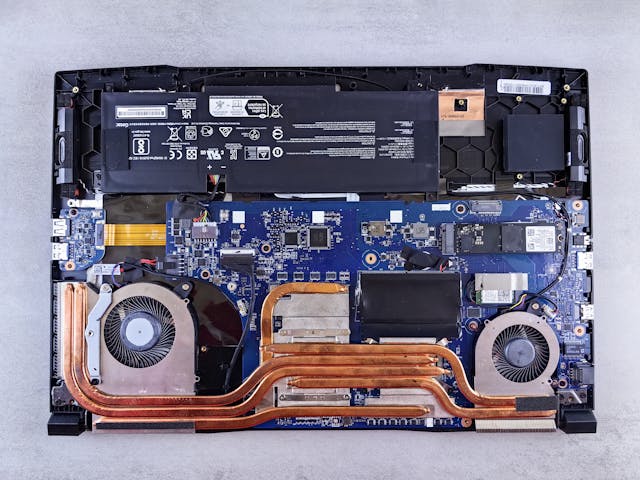
Your laptop's cooling fans spin faster as CPU and GPU temperatures rise. The fans running at maximum speed for long stretches, even when you aren't performing intensive tasks, means your system is working hard to cool itself down. This constant, loud whirring is your computer's cry for help. Fans that continue to spin quickly and make loud noises might indicate a problem. The fans spinning loud for five to twenty seconds when the computer turns on is normal. But when the fan runs at high speed beyond this brief period, dust and debris have accumulated in and around the air vents in time, obstructing airflow and making the fans work harder than normal to remove heat. An unnecessary or corrupt process can consume anywhere between 1% to 100% of the CPU and cause fans to run without stopping to remove excess heat.
The chassis feeling hot to the touch, especially the bottom or the area above the keyboard, means your internal cooling system is overwhelmed. The exhaust vents should push out warm air, but an excessively hot casing means heat is not being dissipated well. Localized overheating on the laptop's bottom indicates blocked air vents or dust buildup near the cooling fan. The area above the function keys sometimes becomes so hot that touching and holding can cause discomfort. This excessive surface heat signals that thermal paste degradation on the CPU or GPU has occurred and caused heat buildup.
You press the Power button and your computer might freeze on a black screen and Windows does not start, or Windows starts but does not respond. The computer may shut down or restart when overheating occurs. Simple tasks or applications take more time to complete than usual. Windows might not respond, restart without warning, or display error messages while in use. Games stop responding during play. Your laptop might shut down and fail to turn back on for several minutes. These shutdowns represent built-in safety measures that protect components from catastrophic failure.
Excess heat, failing graphics hardware, or physical panel damage can lead to persistent flickering. Screen flickering that occurs along with system freezing, random restarts, overheating, or shutdowns may be linked to GPU, motherboard, or power problems. Dust buildup and heavy workloads may worsen the issue and often require professional inspection, repair, or component replacement.
Fix your old laptop's overheating before you list it for sale. This protects both your investment and buyer confidence. Act now to recover substantial resale value that heat damage would eliminate.
Dust accumulation blocks air vents and restricts airflow. This causes fans to work harder while they cool less. Turn off your computer and disconnect the power cable before you begin. Locate air vents on the laptop's sides and bottom. Use compressed air held at a 90-degree angle 6-8 inches away from vents to blow out dust. Never use vacuum cleaners or blowers as they create static electricity that damages electronic components. For laptops with removable batteries, remove them during cleaning to access all vent areas. Clean every 6-12 months to improve cooling performance.
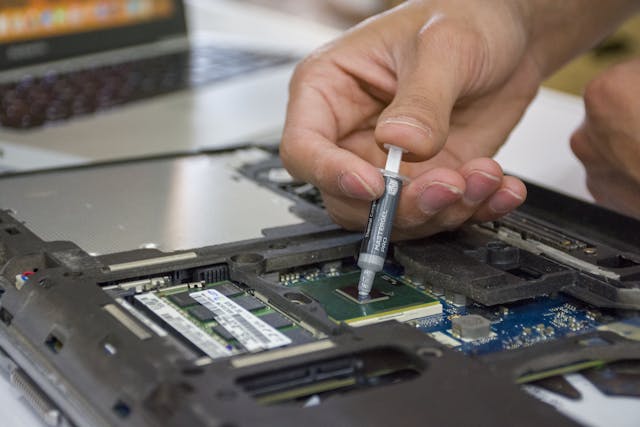
Thermal paste dries out over time. This leads to poor heat transfer between your CPU/GPU and heat sink. Replace thermal paste every 2-3 years to reduce CPU temperature by 10-20°C. Clean old paste from both the processor and heat sink. Use isopropyl alcohol (90% concentration or higher) and a lint-free cloth. Apply a small amount of fresh thermal paste onto the center of the CPU. The amount should be the size of a grain of rice. Avoid touching either surface after you clean them, as fingerprints obstruct thermal transfer.
Lithium-ion batteries generate excess heat when they degrade or fail. Check your battery health through Windows battery reports or manufacturer diagnostics. Replace batteries that show substantial capacity loss or cause localized hot spots where the battery sits.
Outdated drivers cause hardware compatibility issues that result in excessive heat production. Update drivers through Windows Update or Device Manager. Right-click the Start menu and select Device Manager. Download BIOS updates from your laptop manufacturer's website to improve system efficiency.
Professional services provide detailed cleaning, thermal paste replacement and hardware diagnostics when you're uncomfortable performing repairs yourself.
After addressing your old laptop overheating issues, recovery steps determine how much value you reclaim from buyers.
Detailed records of every repair performed on your laptop matter. Receipts for thermal paste replacement, cooling system cleaning, or battery replacement build buyer confidence. A simple cleaning and factory reset can increase your laptop's value by 10-15%. These small actions might add ₹3,000-₹5,000 more to your resale price.
You need to understand condition grading before setting your price. Laptops in mint condition with no visible wear fetch near 100% of market value. Good condition devices with minor scratches and full functionality command 80-90%. Fair condition laptops showing noticeable wear bring 50-70%, while poor condition units with heavy wear sell below 50%. Damaged laptops sell for 30-60% less than their working counterparts, depending on severity.
Your priorities should guide platform selection. Direct sales through online marketplaces often yield higher prices but require more time and effort. Trade-in sites offer convenience and fast payment at lower prices.
You should communicate any previous overheating issues and repairs completed. Transparency builds trust with buyers and prevents rejected pickups or reduced prices after inspection. Highlight working components and completed maintenance to justify your asking price.
Laptop overheating silently destroys resale value through component damage, performance issues, and buyer skepticism. Understanding these impacts and taking preventive action can save you hundreds of rupees when selling.
Taking proactive steps to address overheating before selling transforms a liability into a selling point, ensuring you capture maximum value from your investment rather than accepting steep discounts for preventable damage.
Your old laptop overheating doesn't have to cost you hundreds in lost resale value. Understanding the connection between heat damage and buyer deductions gives you the power to act before the damage becomes irreversible. You might be dealing with a 5 year old laptop overheating or an old gaming laptop struggling to keep cool. The fixes outlined here can recover considerable value. Proper cleaning, thermal paste replacement and system optimization can add ₹3,000 to ₹15,000 back to your asking price when you address overheating. Document your repairs and price transparently according to condition. Choose the right platform for your sale. Act now to protect your investment and get what your laptop's actually worth from buyers.
Yes, overheating can cause permanent damage to critical components including the motherboard, hard drive, graphics card, and battery. Sustained high temperatures accelerate component degradation, leading to hardware failures, performance issues, unexpected shutdowns, and reduced lifespan of internal parts.
Overheating can reduce your laptop's resale value by ₹5,000 to ₹15,000 or more, depending on the severity of heat damage. Buyers typically deduct costs for potential repairs including processor replacement (₹8,000-₹25,000), motherboard replacement (₹12,000-₹30,000), battery replacement (₹3,000-₹8,000), and storage drive replacement (₹3,000-₹8,000).
If your laptop is heating up excessively, it's worth investigating. Common causes include dust accumulation, dried thermal paste, or bloatware. Start by cleaning the vents, updating drivers and software, and checking for unnecessary background processes. If heating persists after these steps, consider professional cleaning and thermal paste replacement.
Yes, but addressing the overheating first significantly increases your resale value. Simple fixes like cleaning vents and replacing thermal paste can add ₹3,000-₹15,000 to your asking price. For laptops less than 5 years old, repairs are usually worth the investment before selling.
Warning signs include fans running constantly at high speed, hot spots on the bottom panel or keyboard, unexpected shutdowns, system crashes, screen flickering, and performance throttling during basic tasks. These symptoms indicate heat-related issues that buyers will notice and factor into their offers.


50000+ - Devices Picked

0 Comments