


 Select your city
 Login
Login
 Select your city Login


 24 Apr 26
 by Shahid Iqbal
 0 Comments
Switching to a new phone shouldn't mean dealing with the hassle of physical SIM cards. Learning how to transfer eSIM between devices makes the transition smooth and instant.
An Embedded Subscriber Identity Module (eSIM) is a digital SIM embedded into your device. With an eSIM transfer, you can activate your number instantly and start using your new phone in minutes. The process is straightforward when you know the right steps, whether you're moving from iPhone to Android, Android to iPhone, or staying within the same ecosystem.
This piece walks you through everything you need to know about eSIM transfer. We'll cover step-by-step instructions for transferring your Jio, Airtel, or Vi eSIM between different devices and platforms.
An eSIM, or embedded Subscriber Identity Module, is a digital SIM card built directly into your device's hardware. Traditional physical SIM cards require insertion into a slot. An eSIM is already embedded in your phone and operates through software activation. Your phone must be carrier-unlocked to use eSIM technology, whatever device model you own.
You'll need to know how to transfer eSIM at the time you upgrade to a new device or switch phones. The digital nature of eSIM means you can activate your mobile plan remotely without waiting for a physical card to arrive. Devices can store multiple eSIM profiles at once, with one or two active at any given time. This flexibility allows you to maintain your home number and use a local data plan during international travel.
The security advantage of eSIM is most important. The SIM is embedded within your device, so it cannot be removed or stolen if your phone is lost. You can remotely lock or erase your eSIM data and transfer it to another device. An estimated 3.08 billion devices will rely on eSIM technology by 2030.
eSIM transfer eliminates the need to purchase local SIM cards in each country you visit if you travel often. You can switch to local networks directly from your phone's settings. This helps you avoid high roaming charges and stay connected abroad.

You'll need to verify that both your current and new devices support eSIM technology before you attempt to transfer your eSIM. Contact your mobile operator to confirm whether your profile can be transferred between devices. Major Indian carriers like Jio, Airtel and Vi each have specific transfer procedures that you'll need to follow.
An eSIM transfer does not erase your data, but backing up important files, contacts and settings prevents possible loss during the transition. Take screenshots of your current carrier's details and Access Point Name settings before you start the transfer. On top of that, note down your setup details, such as QR codes or manual activation codes, in case you need to reactivate your eSIM later.
Some mobile operators allow direct eSIM transfers. Others require you to request a new eSIM profile. If direct transfers are not supported, you'll need to deactivate your eSIM on the old device and request a new QR code from your carrier. Go to the mobile network settings on your new device and select the option to add an eSIM. Scan the QR code provided by your service provider to install the eSIM profile.
Verify that the transfer completed before you delete the eSIM from your old device. Most mobile operators do not allow reinstallation of the same eSIM once deleted. Test your calls, messages and mobile data to ensure everything functions properly on your new phone.
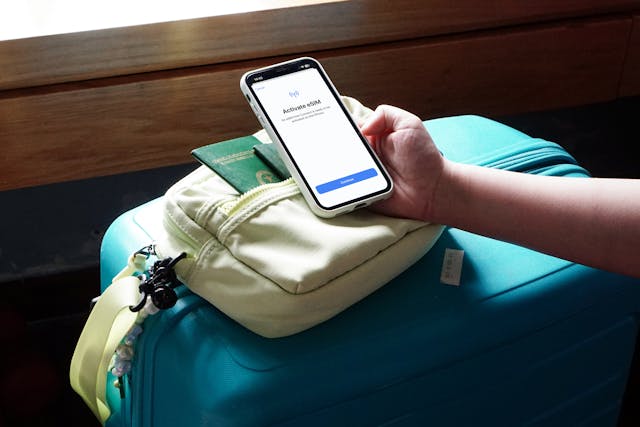
Transfer methods vary substantially across platforms and carriers. iPhone users running iOS 18.4 or later can use eSIM Quick Transfer to enable smooth number migration between devices. Both iPhones must have passcodes enabled and remain nearby with Bluetooth active while connected to the same Apple Account. You can select "Transfer from Nearby iPhone" during setup or later through Settings to start the process. Apple introduced cross-platform eSIM transfer capabilities with iOS 26 that allow direct transfers between iPhone and Android devices from carriers like AT&T, T-Mobile, and Verizon.
Android users can transfer eSIMs during device setup or through Settings. Navigate to Network & Internet, select SIMs, and choose "Transfer SIM from another device". Both devices need Android 12 or later with current Google Play Services and screen lock enabled. The transfer activates during onboarding with supported carriers.
Jio offers multiple transfer options to Indian carriers. iPhone users can follow the Quick Transfer process. Android users must use the MyJio app to enter the new device's EID number and authenticate via OTP. Airtel requires sending "eSIM " to 121, followed by confirmation within 60 seconds and consent via IVR call. Vi users can start transfers through the Vi App by selecting Help and raising a service request to activate eSIM. Enter the 32-digit EID of the new device.
Master the essentials of eSIM transfer to seamlessly switch between devices without the hassle of physical SIM cards.
Remember that most carriers don't allow eSIM reinstallation once deleted, so complete verification before removing it from your previous device. With proper preparation and the right steps, eSIM transfer takes just minutes and eliminates the wait time associated with physical SIM cards.
You now have everything you need to transfer your eSIM between devices without any hassle. The process is straightforward when you follow the right steps, whether you're switching from iPhone to Android or staying within the same ecosystem. Verify device compatibility and contact your carrier before starting the transfer. Your important data needs backing up, including carrier details and activation codes. Test all features after the transfer to ensure everything works on your new phone. eSIM technology continues to evolve and makes device switching easier than ever before.
Yes, you can transfer your eSIM between devices multiple times. The process is straightforward, especially between iPhones running iOS 16 or later, where you can use the Quick Transfer feature by placing both phones near each other with Bluetooth enabled. However, avoid transferring more than once within 24 hours, as this may cause network issues that could leave you without service temporarily.
No, you cannot use the same eSIM profile actively on two phones at the same time. While your device can store multiple eSIM profiles, only one or two can be active at any given moment. When you transfer an eSIM to a new device, it deactivates on the old phone and activates on the new one.
Not necessarily. If you're using compatible devices (like iPhone to iPhone with iOS 16 or later, or Android to Android with Android 12 or later), you can often transfer your eSIM directly through device settings without contacting your carrier. However, some carriers and cross-platform transfers may require you to request a new QR code or use your carrier's app to complete the transfer.
If your eSIM gets stuck during transfer and you lose service on both devices, first try transferring it back to the original phone through your carrier's app or website. If you can't access your account due to verification issues, contact your carrier's customer support via chat or phone. They can see that the transfer didn't complete properly and can reactivate your eSIM from their end, which typically takes just a few minutes.
For iPhone users, you can use the Quick Transfer feature if both devices run iOS 18.4 or later. For Android users, open the MyJio app, enter your new device's EID number (a 32-digit code found in your phone's settings), and authenticate the transfer using the OTP sent to your registered number. The eSIM will activate on your new device once the process is complete.


50000+ - Devices Picked

0 Comments